
If you design any type of industrial controller, terminal for a smart home, portable device, or medical appliance, then choosing the correct display module can be one of the most important things in your work. Engineers often focus on the size of the screen but forget about the other characteristics. That is why you can face some difficulties such as low quality of the image, incompatibility with your hardware, or the necessity to change some of your ideas while working further.
The right 3.5 Inch LCD Display has to correspond to the conditions of use, hardware system, and the needs of long-term functioning. This choice goes far beyond verifying the screen size.
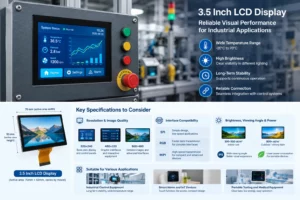
1. Know What You Want from Your Screen Before Choosing a 3.5 Inch LCD Display
Before selecting the display module, you should know what you want from it. Different needs depend on the field of application
1.1 Define the Application Environment
The working environment directly affects display selection.
For industrial equipment such as PLC controllers, automation machines, and testing devices, the display usually needs to support continuous operation. Important factors include:
- Wide operating temperature range, such as -20℃ to 70℃;
- Stable performance during long working hours;
- Higher brightness for different lighting conditions;
- Reliable connection with the control system.
For smart home products and IoT devices, users usually pay more attention to the interaction experience. These products may require touch functions, low power consumption, and a compact design.
Medical and testing equipment requires clear data presentation and stable display performance because users need to read parameters accurately during operation.
1.2 Check Installation Space and Mechanical Design
A compact display does not mean installation is simple. Before choosing a 3.5 Inch LCD Display, engineers should confirm:
- Housing opening dimensions;
- PCB layout space;
- FPC or cable position;
- Mounting method and thickness.
The active display area of a typical 3.5-inch module is around 70mm × 53mm, but the exact dimensions vary depending on the screen structure. Checking these details in advance can prevent mechanical changes during production.
2. Key Specifications of a 3.5 Inch LCD Display You Should Evaluate
Screen size is only one part of the selection process. Other technical parameters determine whether the display can meet project requirements.
2.1 Resolution and Image Quality
Resolution affects image details, text clarity, and the amount of information displayed.
Common options include:
| Resolution | Application |
| 320×240 | Basic data display and simple control panels |
| 480×320 | Graphic interfaces and interactive equipment |
| 800×480 | Detailed images and advanced user interfaces |
For simple monitoring devices, 320×240 can provide sufficient performance. Equipment with menus, icons, and touch operation often benefits from 480×320 resolution. Products requiring more detailed graphics may choose 800×480.
However, higher resolution requires stronger processing capability from the main controller and may increase system cost.
2.2 Interface Compatibility with Your Hardware
The display interface must match the main control system. Common interface options include SPI, RGB, MCU, and MIPI.
| Interface | Features |
| SPI | Simple design and suitable for low-speed applications |
| RGB | Faster data transmission for complex interfaces |
| MIPI | High-speed transmission for compact and advanced devices |
An incompatible interface can increase development difficulty and require additional conversion components. Therefore, interface confirmation should be completed before purchasing.
2.3 Brightness, Viewing Angle and Power Consumption
Brightness and viewing angle influence the actual user experience.
Typical brightness requirements:
- 300-500 cd/m²: Suitable for indoor equipment;
- 800+ cd/m²: Suitable for outdoor or strong-light environments.
The IPS type screen is generally considered favorable when there is a need for a larger viewing angle. In portable gadgets, energy consumption is also a criterion since high brightness means high energy consumption.
3.How to Choose a 3.5 Inch LCD Display for Various Uses?
Various products demand various display features. Selecting based on actual usage can improve product performance and reliability.
3.1 Industrial Control Equipment
Industrial applications usually require long-term stability. A suitable display should support:
- Continuous operation;
- Wide temperature environments;
- Clear parameter display;
- Reliable signal transmission.
For automation equipment that operates many hours every day, display consistency is more important than choosing the lowest-cost option.
3.2 Smart Home and IoT Devices
Smart devices focus on convenient interaction and attractive product design.
Important features include:
- Touch panel support;
- Low power consumption;
- Fast response;
- Compact structure.
A touch-enabled display can improve user operation and reduce the need for physical buttons.
3.3 Portable Testing and Medical Equipment
Portable equipment has strict requirements for size and power usage.
When selecting a display, manufacturers should consider:
- Lightweight design;
- Clear data visibility;
- Low energy consumption;
- Easy operation.
A well-balanced display can provide sufficient information while keeping the device compact.
4. Common Mistakes When Selecting a 3.5 Inch LCD Display
4.1 Choosing Only Based on Price
The lowest price may bring some challenges in manufacturing, such as poor quality, unreliable supplies, and increased replacement costs.
In the case of prolonged projects, reliability and capabilities of the product may be more important than price.
4.2 Ignoring Touch Panel Requirements
Touch technology should be considered early in product development.
| Touch Type | Features |
| Resistive Touch | Lower cost and supports stylus operation |
| Capacitive Touch | Better sensitivity and multi-touch function |
The right touch solution depends on the product function and user requirements.
4.3 Overlooking Supplier Support
A reliable supplier can help reduce development risks through:
- Sample testing;
- Technical support;
- Interface customization;
- Mass production assistance.
5. Comparison of Different 3.5 Inch LCD Display Options
| Feature | Basic LCD | Industrial LCD | High-performance LCD |
| Resolution | 320×240 | 480×320 | 800×480 |
| Brightness | 250-400 cd/m² | 500-800 cd/m² | 800+ cd/m² |
| Application | Simple devices | Industrial equipment | Advanced interfaces |
| Cost | Low | Medium | Higher |
What is most appropriate will depend on the considerations of performance of the display, application needs, and budget constraints of the project.
6. Conclusion
Selecting the best-fit 3.5 Inch LCD Display should be done through a balance of application needs, display parameters, and product reliability. Considering factors such as resolution, interface, brightness, and environmental installation conditions, you will be able to select a display that fits your application.
0